Monday, September 12, 2011

Configuring the MSMQ Receiver Component

Understanding and configuring Named Subsystems is critical for successful use of the EAI Transports. This is a powerful yet relatively misunderstood part of the Siebel Architecture.


@lex at Siebel Essentials has a great article on Named Subsystems so I won't repeat what he said best.

However there are few things that will still cause to you pull your hair out: Advanced parameters - these aren't visible in the UI and can only be managed using the command line tool. Get to know srvrmgr.exe it is your friend - really.
  • To work effectively with the tool, make sure you spool out the results and then use an external editor to view the query results. I use BareTail as it automatically scrolls. One can also limit the columns that are emitted, but that requires remembering each column specifically and then adding those to the command when executing.
list advanced parameters for named subsystem MSMQReceiver
  • If using a dispatch ruleset (highly recommended), this is where you set the name of the ruleset
change parameter RollbackOnDispatchError=False for named subsystem MSMQDataSubsys
  • Xml Converter service - when working with the dispatch service ensure that the ConverterService parameter is set to "EAI XML Converter"
change parameter ConverterService="EAI XML Converter" for named subsystem MSMQDataSubsys
Once your Subsystems are configured you can create (or modify the existing) background component to use these subsystems:
  • "Receiver Data Handling Subsyst" parameter
  • "Receiver Connection Subsystem parameter
You will then still need to specify the Receiver method name to work with the data handling and connection subsystems.
I used ReceiveDispatch as I wanted to use a rules based routing approach (the workflow process/BS is specified in the rule) with a separate return path. One can also specify ReceiveDispatchSend to use same connection parameters for a response.

Thanks

Tuesday, September 6, 2011

Multiple repositories in Siebel Tools

Normally one develops using a single repository but upon occasion - especially when working with support - there is a need to do some testing and/or comparisons with the vanilla repository.

One approach is to load the repository into the Server Db using "Repository Migration Configuration Utility" with a new name - such as "Siebel Repository - Vanilla". Then one can connect to the server db using tools and export sif files for comparisons. This works well for comparisons, but if one is wanting to check for that one "breaking change", then being able to make a quick local change to the repository to then do a compile, managing multiple local repositories is preferable.

Managing Multiple repositories: there are actually two ways of doing this:
  1. Maintain multiple local databases and multiple tools configurations
    • Con: unable to use the Compare Objects --> Other repository command
  2. Single database with multiple repositories integrated
    • Pro: able to use the Compare Objects --> Other Repository command
    • Pro: easy to switch between repositories in one window
I use the second approach as it is a little simpler to manage.

Steps to extract a second repository into your local database (all steps take place within Siebel Tools):
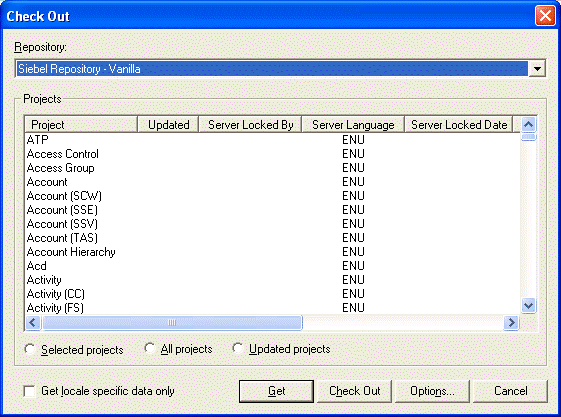
1. Tools --> Check Out
Check out dialog
Choose repository

Click on Get


After clicking on get some warning dialogs appear:
Initial warning

Second warning
These warnings can be dismissed without concern.
Final Warning
Finally after the Get has completed, this dialog appears that indicates you have multiple repositories including one that isn't active.

After I've retrieved the repository I'll lock it locally, make a change and cut a new SRF. If I put it on the server I'll be able to do a quick check to see if that one change was the "breaking change" and is invaluable for providing the feedback to Oracle Support.

[Edit]

I posted a link to this article on a LinkedIn Group and the group's created (an Oracle Support engineer) commented, pointing to the following link in Oracle support:

Multiple Repositories Causes Task Based UI (TBUI) Field To Not Show Any Values [ID 1297783.1] 

Please keep that in mind when using multiple repositories - thanks Valter

Monday, September 5, 2011

MSMQ Inbound Integration

We have built a custom middleware solution at our organization that leverages MSMQ for a lot of workload balancing internally. We have also started to push the MSMQ concept to our application partners as we find that it provides a resiliency to network outages and the various maintenance windows that are required for patches and upgrades.

We haven't done much MSMQ work with Siebel until recently as there wasn't much documentation on the MSMQ transport. However, given the potential, we recently invested the time and effort to make this happen.

These are the requirements that the middleware imposed:
  1. have one inbound queue on our Siebel application server
  2. this one inbound queue would be the channel for multiple message types that might require different processing in Siebel.
  3. once processing is complete (or an exception takes place) processing status for the inbound message needs to be echoed back to the middleware server to a specific message queue


The diagram above illustrates the components and the flow of control and data.

Important points:
  1. The MSMQ Receiver is configured as Receive and Dispatch and not Receive, Dispatch and Send as I wanted to specify a different response queue depending on the situation.
  2. Using the EAI Dispatcher allows the design to accommodate multiple workflow processes based on incoming data. It also allows for parameter injection into the invoked workflow process. (I've found other methods of making workflows environment agnostic, but this is great!)
  3. Sending acknowledgement using an asynch server request is key so that the original message can be committed off the queue - this took me a long time to figure out.
Sending a response was packaged into a workflow process that accepts a message id plus some sort of error message if required. This is then sent back to the middleware system using a standard xml document contract as an xsd/integration object. Middleware then knows to remove the sent message from its internal processing queues.
Getting the right xml converter configured on the MSMQ Receiver was important for the dispatcher so that the (quasi) xpath rules would function properly. In this case the following search expression worked.
/*/SiebelMessage/ListOfShippingHistoryIO
The "/*/" at the beginning accomodates the Siebel-Property-Set root node.

This setup is working well - it's high performance and outage resilient. Just remember to set a reasonable Time-to-recieve on the MSMQ message so that if there is a problem on the Siebel side, the message will bounce back to the sender.

Sunday, September 4, 2011

EAI HTTP Transport

Little known fact: the HTTP transport supports PUT in addition to the documented GET and POST. Just set the HTTPRequestMethod parameter to the literal PUT.

Also, for bonus points the transport supports NTLM authentication out of the box. There is an Oracle Support ticket ([ID 758617.1]) that indicates that it is not, but that is wrong. I did a Wireshark capture from our Siebel server and found that not only did it support NTLM, but it pre-authenticated thus reducing the number of round trips that are required.

---
These undocumented facts were discovered while attempting to integrate InfoPath and Sharepoint with Siebel. As part of our process to bind the products together I need to create an instance xml document of an InfoPath form and then upload it to Sharepoint (thereby storing only the link in the SR attachments table).

Several approaches were taken with varying complexity, but none with satisfaction until I discovered that the HTTP Transport supported PUT. (the instance document is created by an xslt on the server)
1. Have the workflow process save the instance document to a webdav share from sharepoint. It works from windows explorer but not from the EAI File Transport Send method.
2. I explored using the Sharepoint web service API's and creating a Java business service - the complexity was too high for something this simple. It had a code smell to it that I didn't like. Plus this would be our first Java business service so there would have to be a significant server deployment footprint.
3. Use the MSXMLHTTP COM object in a custom business service. The code is dead easy b/c sharepoint supports a simple PUT method to a document library. I was in the process of starting to code the new business service when I decided to just "Try" inserting the PUT into the business service method arg.

So, if your target server want an HTTP PUT you can use it using the built in HTTP Transport.

Tuesday, August 30, 2011

Infopath and Siebel integration

Why would one want to integrate InfoPath and Siebel? Here are some reasons that I thought of:
  • Siebel data is highly structured - it's a relational database after all
  • InfoPath is based on semi-structured data - it's document focused
  • Siebel releases take months
  • InfoPath forms can be updated and released the same day
InfoPath may already be in use as a flexible data capture tool that can be line of business and process specific. It has a great declarative designer that can be used by non-programmers and technical BA's. Also, because it's based on XML, the form data can travel wherever XML is accepted.

Siebel on the other hand is a great work package management tool in directing and assigning work to teams and users. It manages the life cycle of work. Stitching the two tools together is not so easy and requires a bit of thinking for how things need to work together.

Siebel Workflow Wait steps for input validation

One of the most common requests I see involve comparing old row values to proposed row values. This is used in input validation or conditional execution of business logic.

For instance, we wanted to trigger the update to the employee profile if an activity status changed from one status to another status.

This is easily achieved through code using the PreSetFieldValue and WriteRecord events using a shared variable in the buscomp code. In looking for a workflow approach I was able to use a simple workflow that used the Workflow Utilities.Echo method, right after the start step and then right after a wait step with the WriteRecord event attached to it. Simple, see the picture below for an example with a workflow using the Asset Management business object:


The Get Original Value step output argument is configured like this:

Property Name: OriginalStatus
Type: Business Component
Business Component Name: Asset Mgmt - Asset
Business Component Field: Status

The Get New Value step output argument is configured like this:
Property Name: NewStatus
Type: Business Component
Business Component Name: Asset Mgmt - Asset
Business Component Field: Status

This approach works well if you are capturing the events on the primary buscomp of your business object. For example: the Asset Mgmt - Asset bc of the Asset Management bo. Great!

What if you want to capture the events of a child bc. Not so easy - after trolling around Oracle support I came across one document that looked promising: [ID 496724.1]. The problem with this approach is that I was unable to get the values before the write event, in other words, when the wait step was reached the values had already been copied into the BC.

I updated my workflow to include a Workflow Utilities.Echo step before the wait step, but instead of retrieving the values from the BC, I used the expression syntax. It worked beautifully.

The Get Original Value step is configured with output args like this:
Property Name: OriginalStatus
Type: Expression
Business Component Name: Asset Mgmt - Asset
Value: [Status]

The Get New Value step output argument is configured like this:
Property Name: NewStatus
Type: Expression
Business Component Name: Asset Mgmt - Asset
Value: [Status]

Thursday, September 30, 2010

Siebel script export

From time to time, it would be very useful to conduct code analysis on the script that is buried within the multiple tables of the Siebel Repositories.
Things like:
Getting the code out of the repository is a pain. I can use the repository search functionality to find specific things, but its tough.
To solve this I fired up my sql editor and using the xml features of sql 2005, I built a query that exports the script into a big xml document.
One can then run xslt's or other scripts against the code file.
Below is the script:

DECLARE @APPLET_BROWSER XML
DECLARE @APPLET_SERVER XML
DECLARE @BUSINESS_COMP_BROWSER XML
DECLARE @BUSINESS_COMP_SERVER XML
DECLARE @BUSINESS_SERVICE_BROWSER XML
DECLARE @BUSINESS_SERVICE_SERVER XML
DECLARE @APPLICATION_BROWSER XML
DECLARE @APPLICATION_SERVER XML

SET @APPLET_SERVER =
(
SELECT
'Applet Browser Script' "@name",
(
SELECT
A.NAME "@Name",
(
SELECT
D.NAME "@name",
D.LAST_UPD "@lastUpdated",
D.SCRIPT "text()"
FROM S_APLT_BRSSCRPT D
WHERE D.APPLET_ID = A.ROW_ID AND D.REPOSITORY_ID = C.ROW_ID
FOR XML PATH('Method'), Type
)
FROM S_APPLET A
INNER JOIN S_REPOSITORY C ON A.REPOSITORY_ID = C.ROW_ID
WHERE
C.NAME = 'Siebel Repository'
AND A.INACTIVE_FLG = 'N'
AND EXISTS(SELECT * FROM S_APLT_BRSSCRPT B WHERE B.INACTIVE_FLG = 'N' AND A.ROW_ID = B.APPLET_ID)
FOR XML PATH('Object'), Type
)
FOR XML PATH('Type')
)
SET @APPLET_BROWSER =
(
SELECT
'Applet Server Script' "@name",
(
SELECT
A.NAME "@Name",
(
SELECT
D.NAME "@name",
D.LAST_UPD "@lastUpdated",
D.SCRIPT "text()"
FROM S_APPL_WEBSCRPT D
WHERE D.APPLET_ID = A.ROW_ID AND D.REPOSITORY_ID = C.ROW_ID
ORDER BY SEQUENCE
FOR XML PATH('Method'), Type
)
FROM S_APPLET A
INNER JOIN S_REPOSITORY C ON A.REPOSITORY_ID = C.ROW_ID
WHERE
C.NAME = 'Siebel Repository'
AND A.INACTIVE_FLG = 'N'
AND EXISTS(SELECT * FROM S_APPL_WEBSCRPT B WHERE B.INACTIVE_FLG = 'N' AND A.ROW_ID = B.APPLET_ID)
FOR XML PATH('Object'), Type
)
FOR XML PATH('Type')
)
SET @BUSINESS_COMP_SERVER =
(
SELECT
'Business Component Server Script' "@name",
(
SELECT
A.NAME "@Name",
(
SELECT
D.NAME "@name",
D.LAST_UPD "@lastUpdated",
D.SCRIPT "text()"
FROM S_BUSCOMP_SCRIPT D
WHERE D.BUSCOMP_ID = A.ROW_ID AND D.REPOSITORY_ID = C.ROW_ID
ORDER BY SEQUENCE
FOR XML PATH('Method'), Type
)
FROM S_BUSCOMP A
INNER JOIN S_REPOSITORY C ON A.REPOSITORY_ID = C.ROW_ID
WHERE
C.NAME = 'Siebel Repository'
AND A.INACTIVE_FLG = 'N'
AND EXISTS(SELECT * FROM S_BUSCOMP_SCRIPT B WHERE B.INACTIVE_FLG = 'N' AND A.ROW_ID = B.BUSCOMP_ID)
FOR XML PATH('Object'), Type
)
FOR XML PATH('Type')
)
SET @BUSINESS_COMP_BROWSER =
(
SELECT
'Business Component Browser Script' "@name",
(
SELECT
A.NAME "@Name",
(
SELECT
D.NAME "@name",
D.LAST_UPD "@lastUpdated",
D.SCRIPT "text()"
FROM S_BC_BRS_SCRPT D
WHERE D.BUSCOMP_ID = A.ROW_ID AND D.REPOSITORY_ID = C.ROW_ID
FOR XML PATH('Method'), Type
)
FROM S_BUSCOMP A
INNER JOIN S_REPOSITORY C ON A.REPOSITORY_ID = C.ROW_ID
WHERE
C.NAME = 'Siebel Repository'
AND A.INACTIVE_FLG = 'N'
AND EXISTS(SELECT * FROM S_BC_BRS_SCRPT B WHERE B.INACTIVE_FLG = 'N' AND A.ROW_ID = B.BUSCOMP_ID)
FOR XML PATH('Object'), Type
)
FOR XML PATH('Type')
)
SET @BUSINESS_SERVICE_SERVER =
(
SELECT
'Business Service Server Script' "@name",
(
SELECT
A.NAME "@Name",
(
SELECT
D.NAME "@name",
D.LAST_UPD "@lastUpdated",
D.SCRIPT "text()"
FROM S_SERVICE_SCRPT D
WHERE D.SERVICE_ID = A.ROW_ID AND D.REPOSITORY_ID = C.ROW_ID
ORDER BY SEQUENCE
FOR XML PATH('Method'), Type
)
FROM S_SERVICE A
INNER JOIN S_REPOSITORY C ON A.REPOSITORY_ID = C.ROW_ID
WHERE
C.NAME = 'Siebel Repository'
AND A.INACTIVE_FLG = 'N'
AND EXISTS(SELECT * FROM S_SERVICE_SCRPT B WHERE B.INACTIVE_FLG = 'N' AND A.ROW_ID = B.SERVICE_ID)
FOR XML PATH('Object'), Type
)
FOR XML PATH('Type')
)
SET @BUSINESS_SERVICE_BROWSER =
(
SELECT
'Business Service Browser Script' "@name",
(
SELECT
A.NAME "@Name",
(
SELECT
D.NAME "@name",
D.LAST_UPD "@lastUpdated",
D.SCRIPT "text()"
FROM S_SVC_BRS_SCRPT D
WHERE D.SERVICE_ID = A.ROW_ID AND D.REPOSITORY_ID = C.ROW_ID
FOR XML PATH('Method'), Type
)
FROM S_SERVICE A
INNER JOIN S_REPOSITORY C ON A.REPOSITORY_ID = C.ROW_ID
WHERE
C.NAME = 'Siebel Repository'
AND A.INACTIVE_FLG = 'N'
AND EXISTS(SELECT * FROM S_SVC_BRS_SCRPT B WHERE B.INACTIVE_FLG = 'N' AND A.ROW_ID = B.SERVICE_ID)
FOR XML PATH('Object'), Type
)
FOR XML PATH('Type')
)
SET @APPLICATION_SERVER =
(
SELECT
'Application Server Script' "@name",
(
SELECT
A.NAME "@Name",
(
SELECT
D.NAME "@name",
D.LAST_UPD "@lastUpdated",
D.SCRIPT "text()"
FROM S_APPL_SCRIPT D
WHERE D.APPLICATION_ID = A.ROW_ID AND D.REPOSITORY_ID = C.ROW_ID
ORDER BY SEQUENCE
FOR XML PATH('Method'), Type
)
FROM S_APPLICATION A
INNER JOIN S_REPOSITORY C ON A.REPOSITORY_ID = C.ROW_ID
WHERE
C.NAME = 'Siebel Repository'
AND A.INACTIVE_FLG = 'N'
AND EXISTS(SELECT * FROM S_APPL_SCRIPT B WHERE B.INACTIVE_FLG = 'N' AND A.ROW_ID = B.APPLICATION_ID)
FOR XML PATH('Object'), Type
)
FOR XML PATH('Type')
)
SET @APPLICATION_BROWSER =
(
SELECT
'Application Browser Script' "@name",
(
SELECT
A.NAME "@Name",
(
SELECT
D.NAME "@name",
D.LAST_UPD "@lastUpdated",
D.SCRIPT "text()"
FROM S_APPL_BRSSCRPT D
WHERE D.APPLICATION_ID = A.ROW_ID AND D.REPOSITORY_ID = C.ROW_ID
FOR XML PATH('Method'), Type
)
FROM S_APPLICATION A
INNER JOIN S_REPOSITORY C ON A.REPOSITORY_ID = C.ROW_ID
WHERE
C.NAME = 'Siebel Repository'
AND A.INACTIVE_FLG = 'N'
AND EXISTS(SELECT * FROM S_APPL_BRSSCRPT B WHERE B.INACTIVE_FLG = 'N' AND A.ROW_ID = B.APPLICATION_ID)
FOR XML PATH('Object'), Type
)
FOR XML PATH('Type')
)


SELECT @BUSINESS_COMP_SERVER.query('//Type')
UNION ALL
SELECT @BUSINESS_COMP_BROWSER.query('//Type')
UNION ALL
SELECT @BUSINESS_SERVICE_SERVER.query('//Type')
UNION ALL
SELECT @BUSINESS_SERVICE_BROWSER.query('//Type')
UNION ALL
SELECT @APPLICATION_SERVER.query('//Type')
UNION ALL
SELECT @APPLICATION_BROWSER.query('//Type')
UNION ALL
SELECT @APPLET_BROWSER.query('//Type')
UNION ALL
SELECT @APPLET_SERVER.query('//Type')
FOR XML PATH(''), ROOT('Scripting'), TYPE